
Editing templates
Open a template from Managing templates to edit it. The editor has the template's name, an optional description, and its body — the Markdown + Liquid that defines what a report rendered with it looks like.
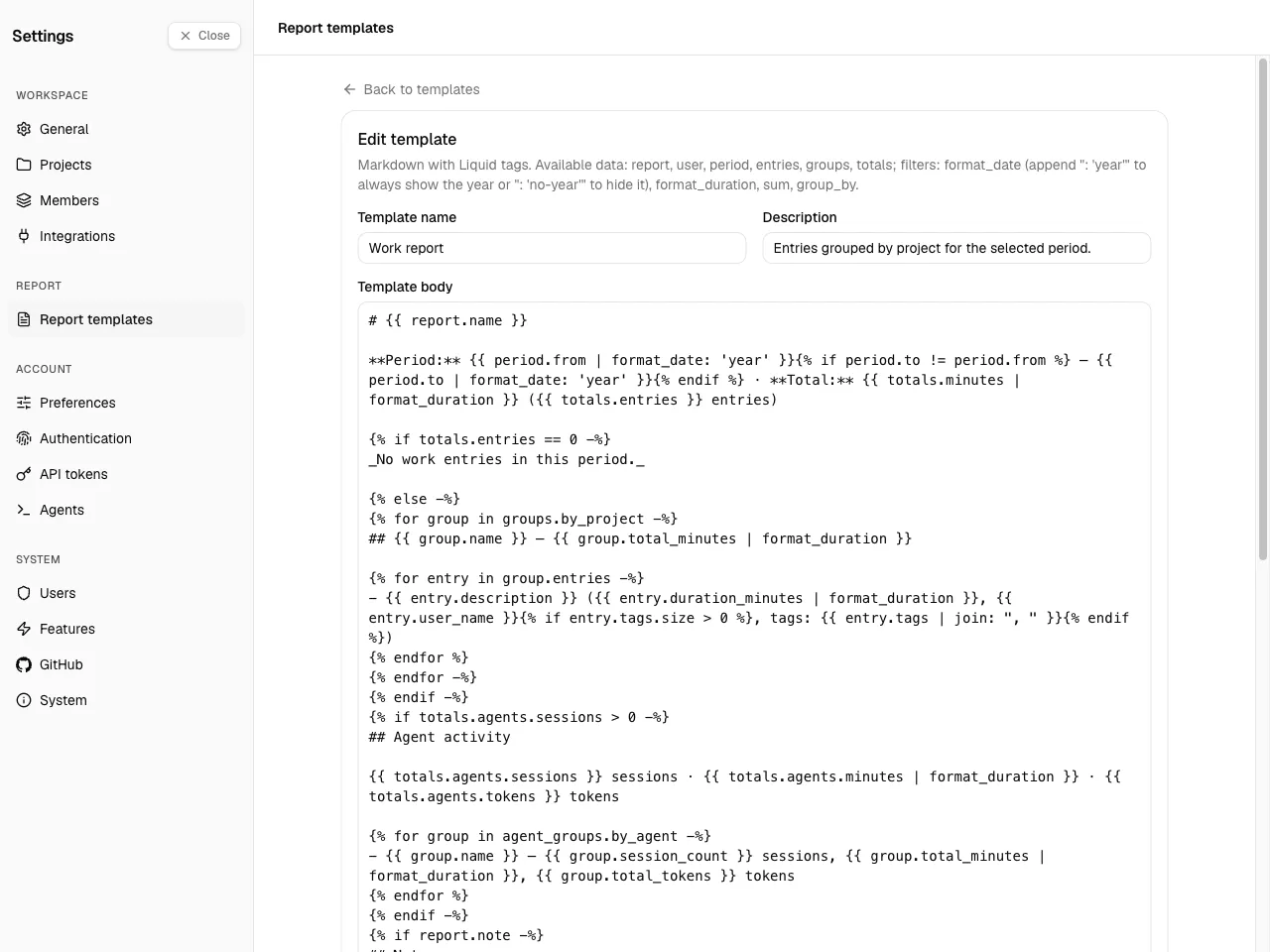
A template body is Markdown with Liquid placeholders. At render time Spantail fills in the report's data — the period, the entries, agent activity, and totals — runs the Liquid, and produces Markdown. The rest of this page is the reference. To see what a template produces, compose a report with it.
The template language
Section titled “The template language”Spantail renders templates with LiquidJS, so the standard Liquid
tags and filters
are available: {{ output }} and {% tag %}; assign, capture, if / elsif / else,
unless, case / when, for (with limit, offset, reversed, break, continue),
increment, comment, raw; the ==, !=, >, <, and, or, contains operators; and
string/number/array filters such as upcase, size, first, join, map, where, sort,
uniq, slice, truncate, replace, plus, round, and default.
On top of that Spantail applies a few rules, because a template is untrusted input:
- Output is HTML-escaped. Every interpolated value has
< > & " 'escaped. Authored Markdown (headings, bold, lists,[text](url)links) still works; raw HTML and angle-bracket autolinks (<https://…>) do not. - Unknown filters error (strict filters), but an unknown variable renders empty rather than
failing — so a typo'd
{{ totls }}yields nothing instead of breaking the report. - No prototype access — only a value's own properties are reachable.
- The
include,render,layout, andblocktags are disabled, so a template can't pull in other files. - Parse, render, and memory limits are enforced (a runaway loop or huge output is stopped).
Variables
Section titled “Variables”These are the variables in scope in a template body.
| Variable | Type | Description |
|---|---|---|
report.name |
string | The report's name. |
report.note |
string | null | The report's free-form note, or null. |
user.name |
string | The name of the user generating the report. |
period.from |
string | Range start, YYYY-MM-DD. |
period.to |
string | Range end, YYYY-MM-DD. |
period.preset |
string | null | today, yesterday, this_week, last_week, this_month, last_month, or null for a custom range. |
period.label |
string | A compact label for the range (e.g. 2026-06 for a month). |
timezone |
string | The IANA timezone the report is rendered in. |
locale |
string | The locale (en / ja) driving date formatting. |
generated_at |
string | ISO 8601 instant the report was generated. |
generated_date |
string | The generation date YYYY-MM-DD in the report timezone. Used as the year reference for format_date. |
workspaces |
array | Workspaces in scope: { id, slug, name }. |
projects |
array | Projects in scope: { id, slug, name, workspace_id }. |
users |
array | Users in scope: { id, name }. |
agents |
array | Registered agents whose sessions appear: { id, name, type }. |
entries |
array | The work entries — see the entry object. |
agent_entries |
array | The agent sessions — see the agent-session object. |
groups |
object | Work entries pre-grouped — see Groups. |
agent_groups |
object | Agent sessions pre-grouped — see Groups. |
totals |
object | Rollup totals — see Totals. |
The entry object
Section titled “The entry object”Each item in entries (and in a group's entries):
| Field | Type | Description |
|---|---|---|
id |
string | Entry id. |
workspace_id |
string | Owning workspace id. |
workspace_name |
string | Workspace name. |
project_id |
string | Project id, or "" when the entry has no project. |
project_name |
string | Project name, or "(no project)". |
user_id |
string | Author id. |
user_name |
string | Author name. |
entry_date |
string | Local date YYYY-MM-DD in the author's timezone. |
duration_minutes |
number | Minutes worked. |
description |
string | What the author logged. |
note |
string | null | Long-form note, or null. |
tags |
string[] | Tags on the entry. |
The agent-session object
Section titled “The agent-session object”Each item in agent_entries (and in an agent group's entries):
| Field | Type | Description |
|---|---|---|
id |
string | Session id. |
workspace_id / workspace_name |
string | Owning workspace. |
project_id / project_name |
string | Project, or "" / "(no project)". |
user_id / user_name |
string | The user the agent acted for. |
agent_id / agent_name |
string | The agent that produced the session. |
entry_date |
string | Local date YYYY-MM-DD of the session's start in the report timezone. |
duration_minutes |
number | Session duration. |
total_tokens |
number | Total tokens (0 when the source exposes no usage). |
input_tokens / output_tokens |
number | Input / output tokens. input + output may be less than total — never derive one from the others. |
cache_creation_tokens / cache_read_tokens |
number | Cache token buckets. |
cost_usd |
number | null | Cost in USD, or null. |
model |
string | null | Model name, or null. |
description |
string | null | Session summary, or null. |
started_at / ended_at |
string | null | ISO 8601 instants, or null. |
Groups
Section titled “Groups”groups holds work entries pre-grouped three ways; agent_groups holds agent sessions grouped
four ways. Each is an array of groups, sorted (by name, or by key for by_date):
groups.by_date,groups.by_project,groups.by_useragent_groups.by_date,agent_groups.by_project,agent_groups.by_user,agent_groups.by_agent
A work-entry group has:
| Field | Type | Description |
|---|---|---|
key |
string | The grouping key (a date, project id, or user id). |
name |
string | The group's display name (project or user name). Absent for by_date — use key. |
entries |
array | The entries in this group. |
total_minutes |
number | Sum of the group's durations. |
An agent group adds total_tokens and session_count, and its entries are
agent sessions.
Totals
Section titled “Totals”| Field | Type | Description |
|---|---|---|
totals.minutes |
number | Total human minutes. |
totals.hours |
number | Total human hours (2 decimals). |
totals.entries |
number | Number of work entries. |
totals.agents.sessions |
number | Number of agent sessions. |
totals.agents.minutes / totals.agents.hours |
number | Agent-session duration. |
totals.agents.tokens |
number | Total agent tokens. |
totals.agents.input_tokens / totals.agents.output_tokens |
number | Agent input / output tokens. |
Custom filters
Section titled “Custom filters”Alongside the standard Liquid filters, Spantail registers four:
format_date
Section titled “format_date”Formats a YYYY-MM-DD string (ISO timestamps reduce to their date part) as a localized date with
a weekday, in the report's language: {{ period.from | format_date }} → Mon, Jun 1
(6月1日(月) in Japanese). Non-date input passes through unchanged.
By default the year appears only when the date falls outside the report's generation year, so a report about the current year stays uncluttered. An argument overrides this:
{{ date | format_date }}— weekday and month/day; the year shows only for other years.{{ date | format_date: 'year' }}— always show the year (Mon, Jun 1, 2026).{{ date | format_date: 'no-year' }}— never show the year.
The starter templates pass 'year', so their period and generation lines always carry the year.
Clock times are never shown by format_date.
format_duration
Section titled “format_duration”Formats a number of minutes as 1h 30m (locale-independent): {{ totals.minutes | format_duration }}.
Adds up numbers, or a numeric property across a list of objects:
group_by
Section titled “group_by”Groups a list of objects by a property, returning { key, items } groups — for a grouping the
built-in groups / agent_groups don't already provide (for example, by tag after a map):
Report defaults from a template
Section titled “Report defaults from a template”Besides the body, a template can pre-fill how a new report composed with it starts out:
- Default report name and Default report note — Liquid that generates the report's initial
name and note. The report form adopts them and keeps them in sync until the author edits the
field by hand. These render with the same variables as the body, except that the report has
no entries yet:
entries,agent_entries,groups,agent_groups, andagentsare empty andtotalsare zero. What's useful here isuser,workspaces,projects,users, andperiod(includingperiod.label). - Default date range — the range a new report starts with: Today, Yesterday, This Week, Last Week, This Month, or Last Month. Leave it unset to fall back to Today.
Safety
Section titled “Safety”Report templates are user input, so rendering runs in a locked-down sandbox you do not need to configure but should be aware of:
- Only a template's own data is reachable — no prototype access — and only the safe built-in filters are available.
- Parse, render, and memory limits are enforced.
- File/include tags (
include,render,layout,block) are disabled, so a template cannot pull in other files. - Rendered Markdown is displayed without raw-HTML passthrough — embedded HTML is not executed.
These protections cannot be turned off.