
Setup Claude Plugin
Spantail records human work as work entries and AI-agent activity as agent sessions. This walkthrough covers the second half: the Spantail plugin for Claude Code captures every session you run, and you turn those sessions into work entries and reports — from the web app, and from inside Claude Code itself.
Pick up where Quick start left off. When you finish, your own Claude Code sessions appear on the timeline next to your work, and you can log work and build a report without leaving your editor.
Before you start
Section titled “Before you start”- You have your own instance, with a workspace and a project — the end state of Quick start.
- Claude Code v2.1.143 or later, which is when plugin settings arrived.
bash,jq, andcurlon yourPATH. The plugin's hooks are shell scripts; they never fail a turn or block a session from ending, and they skip silently when a dependency is missing.gitis optional — with it, a session also carries the branch and repository it ran against.
Capture and use a session
Section titled “Capture and use a session”-
Turn on AI agents.
Agent capture is off by default and only an instance administrator can enable it. Open Settings → Features and turn on Enable agent activity logging.
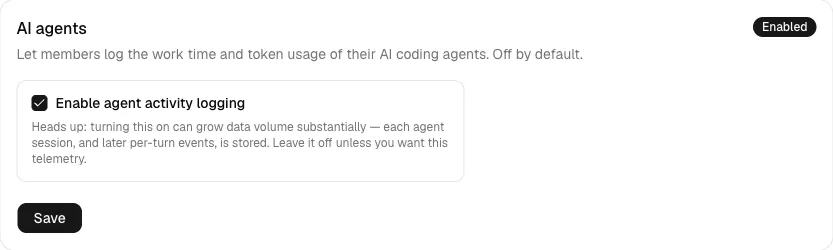
:::caution Turning this on can grow your data volume substantially — each agent session, and each per-turn event behind it, is stored. Leave it off unless you want this telemetry. :::
See System settings for the other instance-wide switches.
-
Register an agent and collect two tokens.
Open Settings → Agents (under Account) and click New agent. Give it a name, pick the type Claude Code, and optionally an expiry. No workspace or project is chosen here — where a session lands is decided per repository by the
/spantail:linkskill in step 3.Saving shows the agent access token (
spantail_aat_…) once. Copy it now — it is never shown again.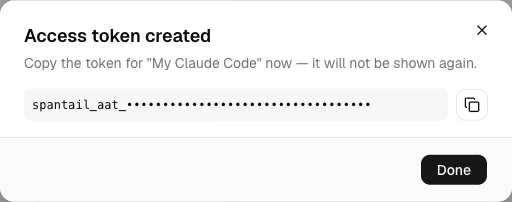
That was the first of the two tokens. It is write-only and ingest-only: it can send agent activity and nothing else. The plugin's skills act as you, so they need a second credential.
The second token is a personal API token (
spantail_pat_…): issue one under Settings → API tokens. Create it now if you plan to do step 5.The full model — what an agent is, which token does what — is in Capturing agent activity.
-
Install the plugin and record a session.
In Claude Code:
When the install asks for a scope, pick user: one install covers every repository you work in. The plugin's configuration is stored per user anyway — Claude Code shares it across all your repositories whatever scope you pick — and it carries your personal tokens, so it never belongs in a committed file. Which workspace and project a repository's sessions land in is not part of this config; you set that per repository in the next step.
Enabling the plugin prompts for its Plugin options:
- Spantail instance URL — the instance URL from the quickstart
(
https://spantail.<your-subdomain>.workers.dev). - Agent access token — the
spantail_aat_…token from step 2. - Personal API token — the
spantail_pat_…token from step 2; the skills need it. Leave blank to use only the telemetry hooks. - Send plan title as session summary — when ON, a session that used plan mode sends its plan file's title to Spantail as the entry description when it ends.
Next, in the repository you are working in, link its sessions to the workspace and project from the quickstart:
The skill asks for the workspace and project ids (copy them with the copy buttons in the sidebar: workspace switcher and project list) and writes them to
.spantail/config.local.json— personal; keep it out of git (the skill reminds you if it is not ignored yet). Repeat this in every repository you want attributed; an unlinked repository has nowhere to land, so its sessions are rejected rather than silently misattributed./spantail:doctorshows the effective configuration and flags an unlinked repository.The plugin registers three hooks, two of which send anything. On every Stop — the end of a turn — it posts that turn's token usage, timestamp, and model name, tagged with your git branch, repository URL, working directory, Claude Code version, and the provider request id. On SessionEnd it re-posts idempotently and then finalizes the session with its wall-clock end and the pull requests it touched. SessionStart sends nothing: it only exports the session id so
/spantail:summarycan target the session you are in.:::note The hooks send compact telemetry only. Conversation bodies, thinking, and tool input and output never leave your machine. The one exception is opt-in:
sendSessionSummary(or/spantail:summary onfor a single session) sends the title of the session's plan file as the entry's description. :::Now use Claude Code normally for a few minutes and end the session. Back in Spantail, open your agent from the workspace sidebar: its activity page lists the session, and opening a row shows its duration, token usage, and the branches and repositories it touched.
The full settings reference, the environment-variable overrides, and how to run the hooks without the plugin are in Claude Plugin — and the wire format in the ingest API.
- Spantail instance URL — the instance URL from the quickstart
(
-
Turn sessions into a work entry.
A session records what your agent did; a work entry records what you did. On the agent's activity page, tick one or more of your own sessions and click Log work from selection (or press C).
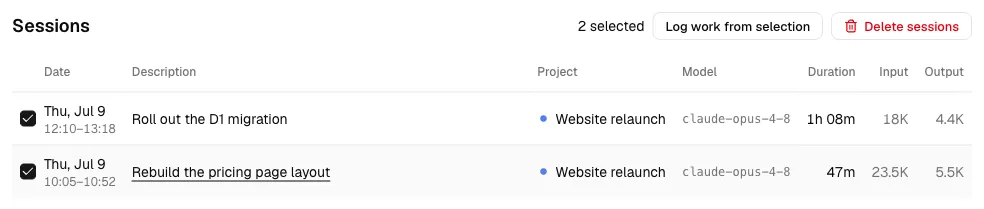
The entry dialog opens pre-filled from the selection: the duration is their sum, the date is the day that carries most of it, the description comes from the session (several sessions become a bulleted note instead), and the project is the one they share. Every field stays editable, and a banner reminds you what the entry is being built from.
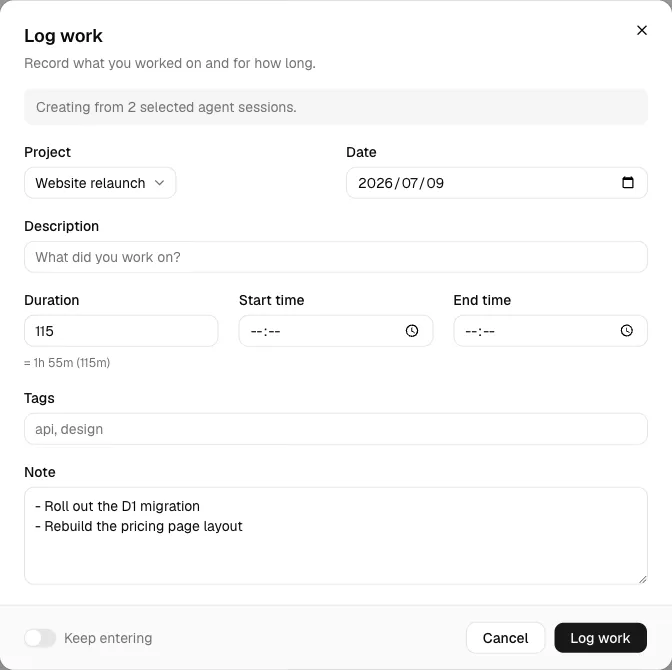
You can only link your own sessions, they must share one project, and up to 50 at a time. Save, and the entry joins your timeline — linked to the sessions it came from.
-
Log work and build a report from Claude Code.
The plugin also ships skills. Unlike the hooks, they act as you over Spantail's MCP connection, which is why they need the personal API token from step 2.
/spantail:log-workwith no arguments proposes an entry from the session you are in — it summarizes the work, estimates the time, and asks you to confirm before logging. Give it free text (/spantail:log-work fixed auth bug, 2h, project core) to dictate the entry instead./spantail:log-work #123 2h yesterdaylogs against a GitHub issue. The server resolves the project from its repository mapping, fills in the issue title and labels, and links the agent sessions that match — see GitHub integration to set the mapping up./spantail:create-reportcomposes a report. It always renders a preview and shows it to you before saving anything.Two read-only agents come along too:
spantail-work-analystfor retrospectives over your work entries, andspantail-agent-activity-analystfor the session telemetry the hooks collected.
What you built
Section titled “What you built”Your Claude Code sessions now flow into Spantail on their own, and both of the ways to act on them are wired up: the web app, where you select sessions and turn them into a work entry, and Claude Code itself, where a skill logs work or builds a report as you.
Where to go next
Section titled “Where to go next”- Setup GitHub Integration — the last hands-on: comment
@spantail 2hon an issue and let the entry find your sessions. - Capturing agent activity — agents, tokens, and the activity page in full.
- Claude Plugin — every setting, what each hook sends, and running the hooks without the plugin.
- MCP — connect other AI clients to the same tools.
- Reports & messages — share and discuss what you report.
- GitHub integration — map repositories to
projects so
#123resolves.